
MediaMTX-powered

Stream from anywhere. Control from home.

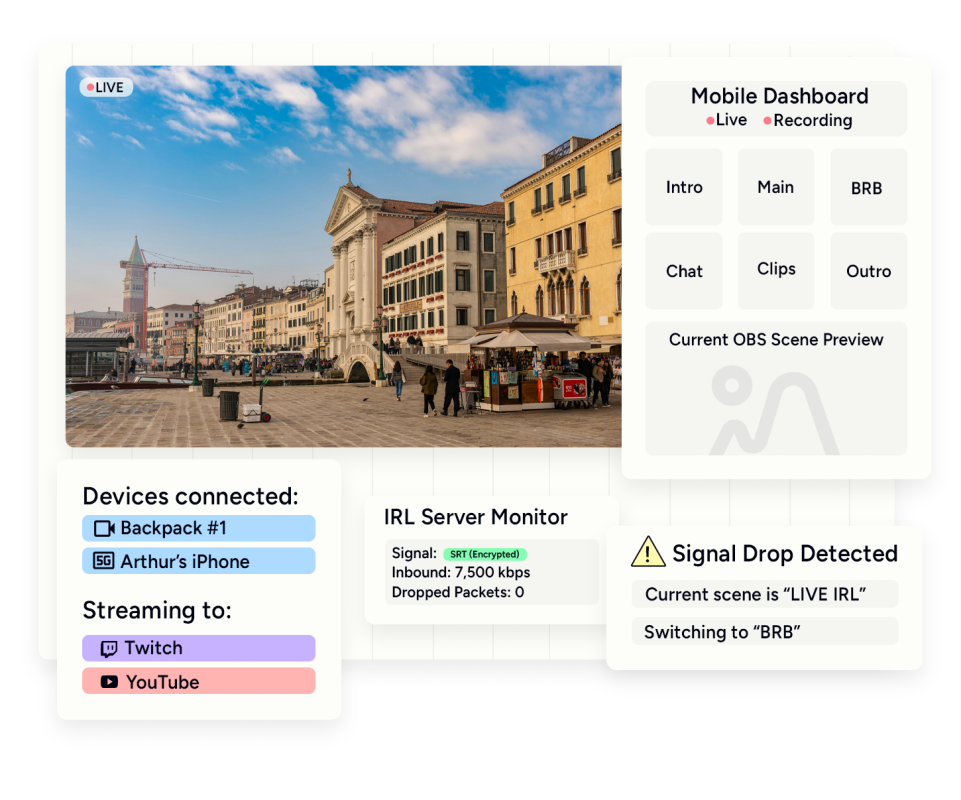
Your PC becomes a streaming server. Phone, backpack, or both, I route it to OBS with automatic failover.

Your own streaming server

MediaMTX runs on your PC and talks directly to OBS. No third-party middleman.

Phone or backpack—your choice

Stream from a dedicated IRL backpack or just your phone. Both work.

Automatic scene switching

Feed drops? "Low bitrate" shows up. Feed returns? Back to your main scene.

Control on the go

Start, stop, swap scenes, adjust sources—all from your phone while you're out.

See it in action

Your stream stays live

Cell signal drops for a second. Your viewers see "reconnecting" instead of a frozen frame. Feed comes back, scene swaps automatically.

MediaMTX runs on your machine

I install and configure MediaMTX on your streaming PC. It receives RTMP or SRT from your phone or backpack and pipes it straight into OBS. I handle all the port forwarding, you get a stable endpoint your mobile device can push to.

  • MediaMTX installed and configured
  • Port forwarding / tunneling set up
  • Works with RTMP and SRT streams
  • Connects directly to OBS

Your stream handles dropouts

IRL means unstable connections. When your feed drops or bitrate tanks, OBS automatically switches to a "reconnecting" or "low bitrate" scene. When the feed stabilizes, it swaps back to your main scene. No manual intervention needed. I also set up a bitrate overlay so your viewers know what's happening.

  • Automatic scene switching on disconnect
  • "Low bitrate" scene trigger
  • Return-to-main when feed recovers
  • Bitrate text overlay for viewers

Run your stream from your pocket

I set up a separate control method so you can manage OBS while you're out. Start and stop the stream, swap scenes, toggle sources—all from your phone. This uses a dedicated control channel, not your stream connection. So even if your video feed is struggling, your controls still work.

  • Start/stop stream remotely
  • Scene switching from phone
  • Source toggling on the fly
  • Independent from video feed

IRL Server

$90

Complete IRL streaming solution. Save $10 by booking direct.

What's included

  • Custom streaming server (MediaMTX)
  • Complete network setup
  • Direct OBS integration
  • Smart automatic failover
  • Live bitrate overlay
  • Independent remote control

Works with

  • iOS & Android devices (via Moblin, IRL Pro, etc.)
  • IRL Backpacks (LiveU, Belabox, etc.)
  • Hardware encoders (Teradek, Kiloview)
  • Action cameras (GoPro, DJI w/ RTMP support)
"
"I’ve been struggling with my audio setup forever and honestly thought there was something wrong with my equipment. He jumped in, checked everything step by step, and fixed issues I didn’t even know I had. My mic sounds studio quality now no more weird buzzing, no cutting out, nothing. He was patient, explained things clearly, and even helped me learn what each setting actually does so I don’t mess it up again 😅 Really happy with the result and definitely recommend for anyone having audio or mic problems. Thank you again! 🙌♥️"
Tilminah

FAQs

Do I need a backpack or can I just use my phone?

Either works. Phone streaming is simpler—apps like Moblin push directly to your server. Backpacks like LiveU or Belabox give you better reliability and bonded connections, but cost more and take more setup. I configure for whatever you're using.

What about my home internet? Will this work on my connection?

Depends on your upload speed and whether your ISP lets you open ports. If they don't, I use tunneling services to work around it. I'll figure out what works for your situation.

What's the latency like?

Depends on your network, SRT is typically 1-3 seconds. From your phone to your PC to Twitch, you're looking at maybe 5-10 seconds total. Not instant, but good enough for IRL.

Ready to stop fighting your setup?